Console
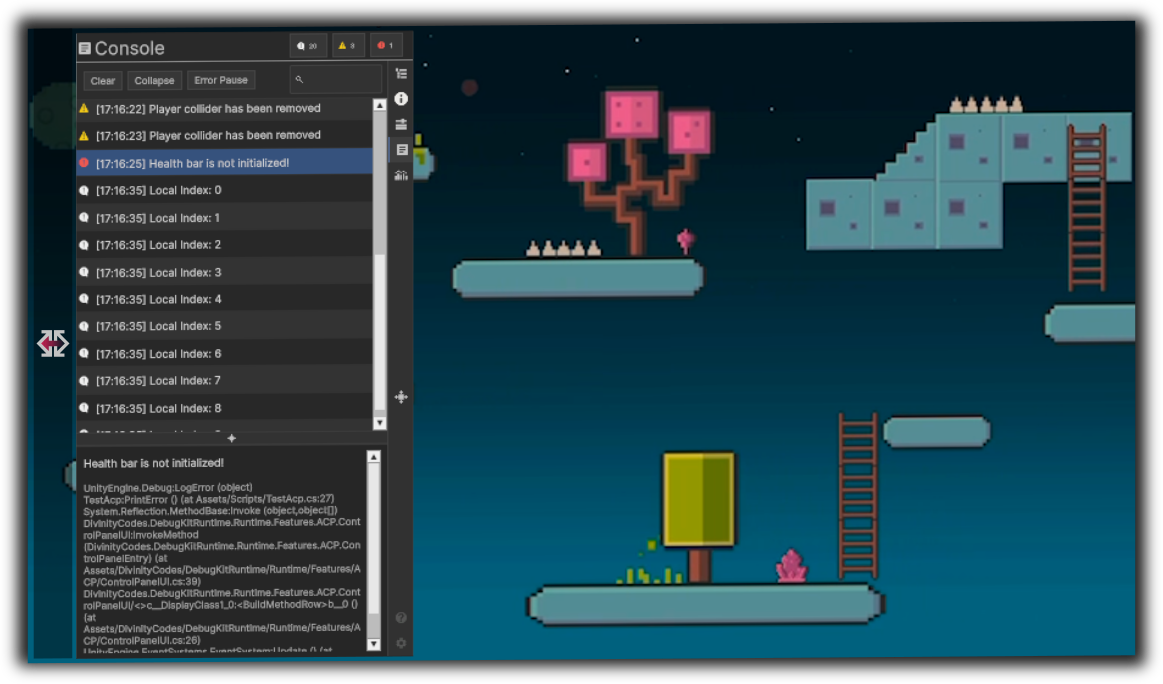
The Console feature captures runtime log messages and displays them in a filterable list with optional stack traces and search. It is the in-build equivalent of viewing logs without the Unity Editor.
Overview
- Purpose: Capture and inspect Log, Warning, and Error messages at runtime, with search, filters, and stack traces.
- UI: Toolbar (Clear, Collapse, Error Pause, search), list of entries, and a resizable detail panel (message + stack trace).
- Source: Uses
Application.logMessageReceived(main thread only) so entries are not duplicated.
Benefits
| Benefit | Description |
|---|---|
| Device logging | See Debug.Log / LogWarning / LogError output on device. |
| Filter by type | Toggle Log, Warning, and Error independently. Counts appear in the header. |
| Search | Filter entries by text in the message. |
| Collapse | Group identical messages and show a count. |
| Stack traces | Select an entry to view the full stack trace in the detail panel. |
| Error Pause | Optionally pause the game when an error is logged. |
| Clear | Clear the list manually, or automatically on play (preference). |